PNG to OBJ Mesh Tool
A downloadable tool
A tiny tool that turns a transparent PNG into a UV-ready triangle mesh. It’s a personal utility inspired by Adobe Puppet Warp and Blender’s (now mostly defunct) COA Tools - handy for quickly rigging/warping flat artwork or exporting simple cutout meshes for games and motion.
No installs, no need for a server, no selling your data or sign ups, and no installing Python etc. Just extract the zip, open the "PNG to OBJ.html" and go.
What it does
-
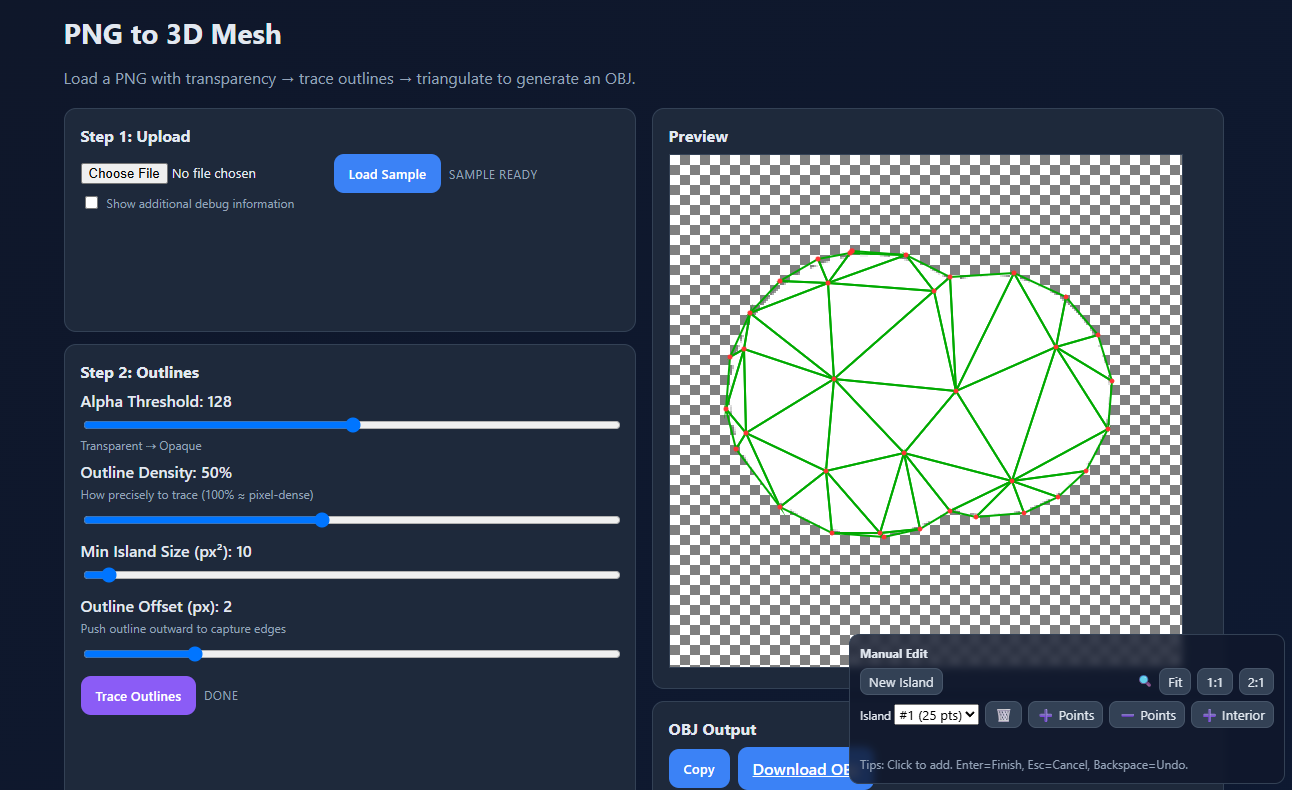
Outline from alpha: Traces opaque regions in your PNG to find “islands” (separate shapes).
-
Adjustable density: Set outline precision and interior point density.
-
Manual edits: Click to add/remove outline vertices or drop interior points where you need more support.
-
Fast triangulation: Builds triangles using a Delaunay-style method (Bowyer–Watson). Resulting faces are generally well-shaped and distribute evenly across the island.
-
OBJ export: One click to copy or download a UV’ed OBJ (UVs map directly to the original image).
How it works
After converting the image’s alpha to a binary mask, the tool performs hole-aware boundary tracing to extract closed polygons (islands). It then scatters interior points (Poisson-like sampling) and runs Delaunay triangulation (Bowyer–Watson) to produce a set of non-overlapping triangles. UVs are generated in image space so your PNG texture lands exactly where you expect.
Workflow
-
Open the HTML file.
-
Upload your PNG (transparency defines the island shapes).
-
Tune Alpha Threshold, Outline Density, Min Island Size, and Outline Offset.
-
Click Trace Outlines to preview borders.
-
Optionally switch the editor to Add/Remove Points for fine control, and add Interior points where extra detail is needed.
-
-
Calculate Triangles, then Download OBJ
You can also copy and paste the OBJ into Notepad or similar if the download button doesn't work for your security settings
-
Tidy up and rig in your favourite 3D program
In Blender, if triangles look skewed after transforms, enable N-panel options and turn on Correct Face Attributes to preserve UVs/attributes while editing.
Limitations & Notes
-
Image size: Not heavily tested above ~2K on the longer side. If things feel slow, downsample your image before using.
Tested only in Chrome: as a tool helping me with my game, I've ignored cross-browser testing - drop in the comments if it works well or not in other browsers
-
Edges: Triangles near sharp edges can sometimes be long or skipped. Add a few interior points near those areas, increase interior density, or slightly increase Outline Offset.
Interior points are suggestions for the Triangulation: this will help give you contours you might want, but doesn't guarantee it
Doubled up Islands: make sure to check if there are any doubled islands - this can create duplicate triangles, use the trash to remove those extra islands
This is cool - why's it free?
This code is a blend of my code/understanding, ChatGPT, and Claude contributions - I was just looking at speeding up my art preparation process - but it's turned out pretty good, and I feel like others will find it handy! As it’s stitched together from different research sources and experiments, I’m respecting it's not, on whole, my work (though took a long time to make!). If it saves you time and you’d like to see more tools like this, donations are welcome and help me justify polishing and releasing future utilities.
Have fun meshing!
Download
Click download now to get access to the following files:
Leave a comment
Log in with itch.io to leave a comment.